1
NewsPinned
Affont 1.0.9: new Export screen, font image in PNG, ligatures and alternates in the template

What’s new:
- The Export screen has been redesigned: your font, live, on the left (name, waterfall and character set) and the export options on the right. You can now save that image of your font as a PNG, handy for sharing it or showing it in Show & tell.
- When you export, Affont asks where to save the font the first time, and the notice shows the folder with a “Show” button.
- New sets in the Affinity template: basic ligatures (ff fi fl ffi ffl ft fft tt ct st www), alternates (other styles, subscripts, fractions, etc.) and symbols (arrows, signs, currency, etc.). They also work on a template you already have: only the missing cells are added.
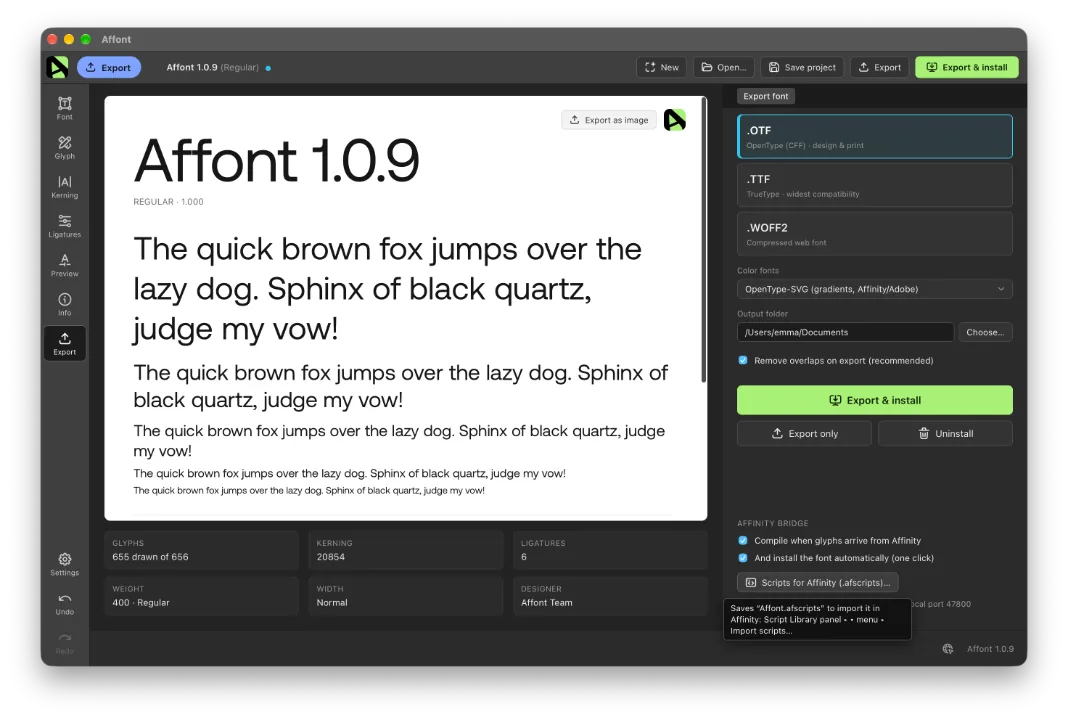
After updating, import the Affinity scripts again to get the new sets in the template:
- In Affont: Settings ▸ Scripts for Affinity (.afscripts)…
- In Affinity: Script Library ▸ ▾ menu ▸ Import scripts… (delete the old “Affont” category first).