Affont 1.1.3: Contextual alternates
 Emmanuel from AffontTeamTeam·
What’s new:
Contextual alternates
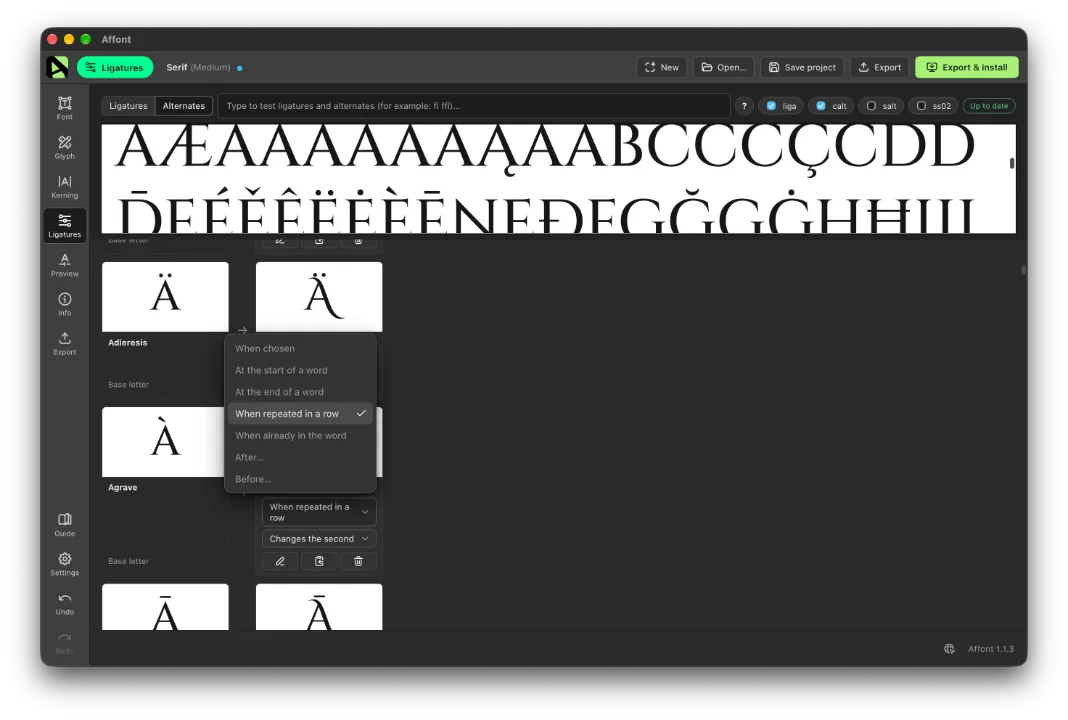
Alternates can now change on their own depending on the letters around them, with nothing to turn on. In the Ligatures screen, each alternate has a menu that says when it appears:
- At the start of a word or At the end of a word: for example, an F with a swash only at the beginning, or an s with a tail only at the end.
- When repeated in a row (“ll”, “ee”) or When already in the word (the two A’s in “AVOCADO”): the repeated letter uses the alternate, so the text looks handwritten. If a letter has several alternates, they take turns, and you choose whether the first or the second one changes.
- After… or Before… certain letters you type, for example “r v w”.
Affinity, Adobe apps, macOS and browsers apply them automatically.
Ligatures in context too
Besides Standard and Discretionary, a ligature can now appear only at the start or end of a word, or next to certain letters. For example, R + A joined only at the start of a word.
By name
Alternates named “.init” and “.fina” now appear on their own at the start and end of a word: name the cells that way in the Affinity template and they just work.
Quicker navigation
At the top of the Ligatures screen, Ligatures | Alternates takes you straight to each part of the list.