
 For Affinity
Face Liquify for Affinity
It finds the faces on your layer and lets you reshape eyes, eyebrows, nose, mouth, cheekbones and face shape, dragging handles on the face or moving sliders, with a live preview. Like Photoshop’s Liquify › Face, inside Affinity.
The key and the installer arrive by email right after your purchase.
Windows 10 and 11 · macOS · Affinity 3 · One-time payment · 3 computers
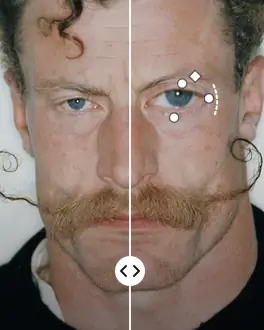
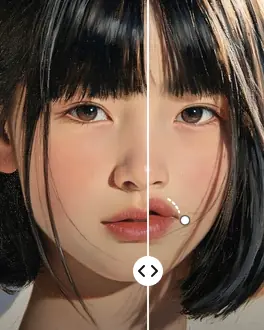
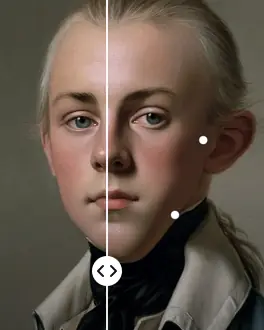
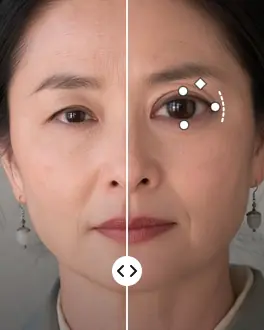
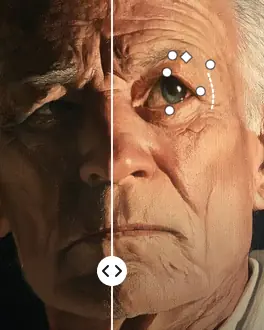
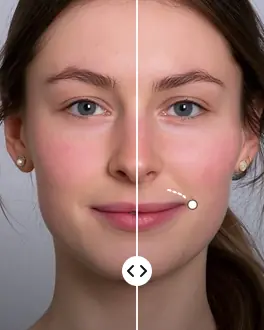
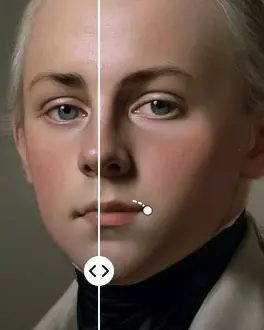
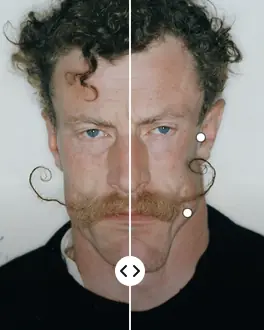
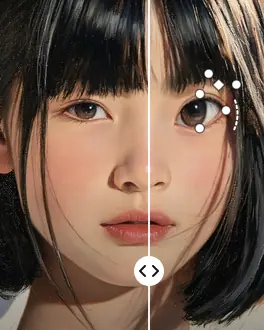
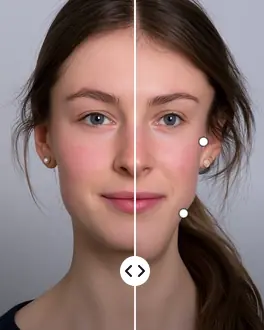
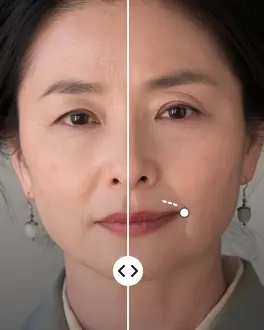
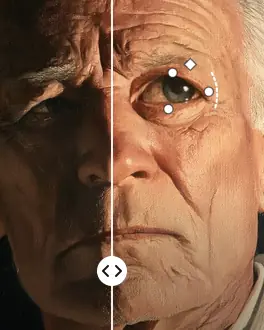
On-face handles
Drag the face itself
Hover a face and the handles appear on the eyes, the eyebrows, the nose, the mouth and the jaw. Drag them, or move the sliders: the preview follows while you work, and nothing is applied until you say so.
- Handles and sliders change the same controls
- Each face in a group photo is edited on its own
- Scroll to zoom in and check the detail
Retouch faces in Affinity, feature by feature
Eyes, eyebrows, nose, mouth, cheekbones and face shape, each with its own controls. The same names and shortcuts as Photoshop, so there’s nothing new to learn.
Finds the faces for you
Open the filter and it finds every face on the layer, even in group photos and even small ones. Click a face to work on it.
18 controls
Eye size, height, width, tilt and distance. Nose height and width. Smile, upper and lower lip, mouth width and height. Forehead, chin, jawline and face width. And eyebrow height and tilt, and cheekbones.
Freeze mask
Paint what must not move, with Freeze and Thaw, size, density and pressure, and the A, F, D and H keys, like in Photoshop.
Natural results
Each control moves a local piece of the face at the size of that feature. No single control bends the image, even at the maximum.
Remembers your edit
Reopen the filter on the same layer, even after undoing, and the controls come back where you left them.
Any document
RGB, grayscale and CMYK, 8 and 16 bits, with transparency. The result is written from the original pixels, with no loss.
Private, on your computer
Face detection runs on your computer. Your photos never leave it. It only goes online to activate the license and check for updates.
8 languages
English, Spanish, Portuguese, Japanese, Indonesian, Dutch, Vietnamese and Chinese, with Photoshop’s names for every control.
Updates included
When there’s a new version, the window lets you know and updates with one click. New features come at no extra cost.
Side by side with Photoshop
Face Liquify brings the Face tool of Photoshop’s Liquify filter to Affinity, which doesn’t have one.
| Face Liquify | Photoshop · Liquify › Face | Face Liquify · Affinity |
|---|---|---|
| Finds the faces automatically | Yes | Yes |
| Handles on the face | Yes | Yes |
| Controls | 16 | 18 |
| Freeze mask | Yes | Yes |
| Several faces in one photo | Yes | Yes |
| Works in Affinity | No | Yes |
| Price | Creative Cloud subscription | USD $8, once, for 3 computers |
How it works
From a portrait to a retouched face in three steps, without leaving Affinity.
Select a pixel layer
Open your photo in Affinity, select the layer with the faces and choose Filters › Plugins › Visual.af › Face Liquify. Duplicate the layer first if you want to keep the original.
Shape the face
Hover a face and drag the handles, or move the sliders on the right. Freeze what must stay still. Zoom in to check the detail.
Apply
Click “Apply” and the result goes back to your layer, from the original pixels, in the colour mode and bit depth of your document.
One price, paid once
No subscription. The license works on three computers, Windows or Mac, and includes every update.
License
You get the key by email after your purchase. The window asks for it the first time you open it; paste it and you’re done.
If you leave the purchase halfway, you may get an email reminder (more).
- Face Liquify for Windows and Mac
- Up to 3 computers
- Every control and feature
- Updates included
- Works offline for 14 days
It installs in a minute
The same three steps on Windows and Mac. The installer does the rest.
Buy the license
The key and the link to the installer, for Windows and Mac, arrive by email. You can download it again any time from your account.
Open the installer
FaceLiquify-Setup.exe on Windows, FaceLiquify-Setup.pkg on Mac. It takes a few seconds. If Windows shows “Windows protected your PC”, click “More info” and then “Run anyway”.
Restart Affinity
Select a pixel layer and choose Pixel › Filters › Plugins › Visual.af › Face Liquify. Paste your key the first time.
Frequently asked questions
Does Affinity have a Liquify › Face like Photoshop?
Not built in. Affinity has a Liquify persona with brushes, but no tool that finds the faces and gives you controls for the eyes, nose, mouth and face shape, like Photoshop’s Liquify › Face. Face Liquify by Visual.af adds one: you open it from Filters › Plugins, it finds the faces on your layer and you shape them with handles and sliders.
Does it work on a Mac?
Yes. Download the Mac installer (FaceLiquify-Setup.pkg): it works with Affinity 3 on Macs with Apple Silicon or Intel. The installer is signed and notarized by Apple, so it opens without warnings.
Is there a free version or a trial?
No. Face Liquify is a paid plugin: the license costs USD $8, you pay it once and it works on three computers.
Does it find every face?
It finds frontal and slightly turned faces, even small ones in group photos. It may miss faces in profile, very dark ones or ones covered by hands or hair. Each face it finds is edited on its own.
Do my photos leave my computer?
No. Face detection and the deformation run on your computer. It only goes online to activate the license and check for updates.
Does it create a new layer?
No. Like every filter in Affinity, the result replaces the selected layer. Duplicate it first with Ctrl+J (⌘J on a Mac) if you want to keep the original, or undo with Ctrl+Z (⌘Z). If you reopen the filter on that layer, your edit comes back and you can keep adjusting it.
Does it work with text, vectors or groups?
It works on pixel layers and rasterized images with at least one human face in them. To retouch a face inside text, a group or a placed image, convert it to pixels first (rasterize it).
On how many computers can I use the license?
On three, Windows or Mac. If you change computers, you can free one up from the window itself with your purchase email.
Does it need the internet?
Only to activate the license and check for updates. Offline, the license keeps working for 14 days.
How do updates work?
When there’s a new version, the window shows a notice with an “Update” button. Affinity uses the new version the next time it starts.
Get Face Liquify
USD $8, once. Windows and Mac, three computers, updates included.